ZED ZONE Mods: Steam Workshop Guide, Best Mod Types and Multiplayer Rules
How ZED ZONE mods work in the Steam Workshop era: installing .zedmod files, using the in-game MOD Manager, the most popular mod types, and 1.0 multiplayer mod sync.
FAQ
Does ZED ZONE have Steam Workshop support?
How do I install ZED ZONE mods?
Do ZED ZONE mods work in multiplayer?
Does ZED ZONE Support Mods and Steam Workshop?
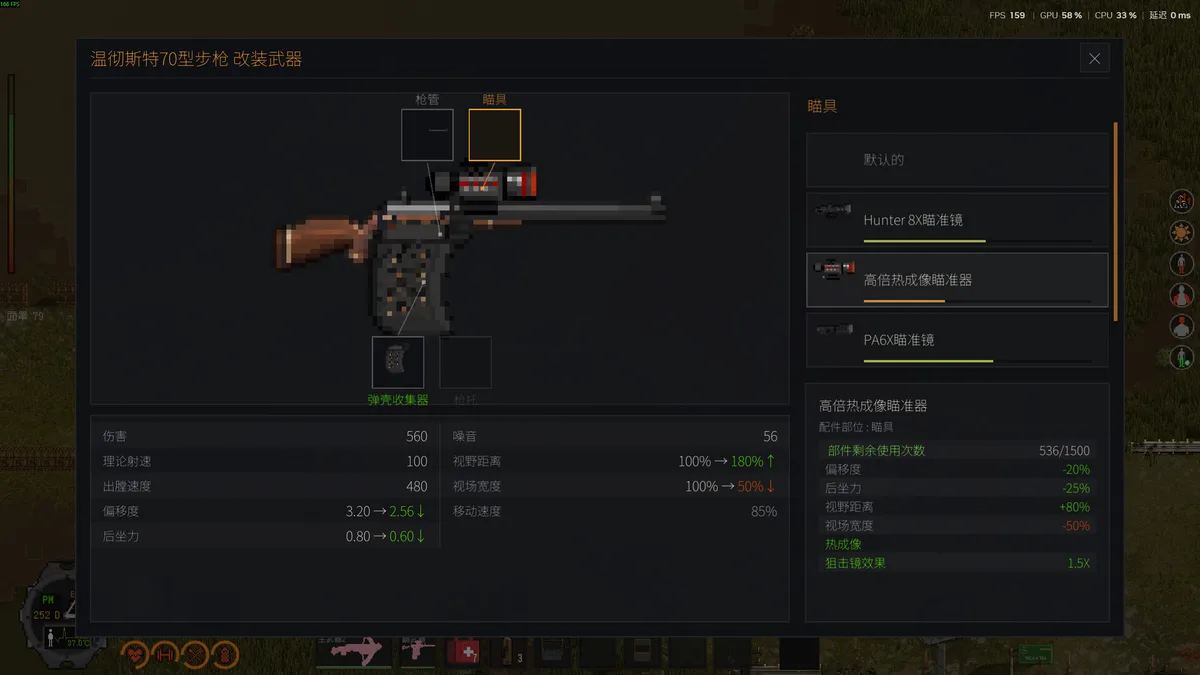
Yes — and the answer changed dramatically at 1.0. ZED ZONE mods today live on an official Steam Workshop hub, backed by a built-in MOD Editor that the developer documents in an official Workshop guide: creators assemble custom weapons with zero coding, adjust stats, crop textures, add localization, and publish to Workshop in one click. The officially supported mod types currently center on ranged weapons, with weapon appearance editing, stat editing and collection packs all listed as supported. Crossover and cosmetic collections sit alongside gameplay items on the hub.
To understand why this matters, it helps to remember what ZED ZONE mods looked like before 1.0. During the three-year Early Access period the game was strictly single-player, and the mod scene revolved around external trainers and memory tools — WeMod shipped a trainer with health, stamina and durability cheats within days of the March 2023 launch, and Cheat Engine tables followed — plus the game’s own built-in spawn console, which is still the fastest vanilla “mod” available. When players asked about official mod support back in 2023, the developer’s roadmap already mentioned providing an interface for mod authors. That promise became the Workshop and MOD Editor pipeline, and the arrival of official co-op at 1.0 (November 6, 2026) shifted the scene’s center of gravity from cheating tools to content creation.
How Do I Install and Manage ZED ZONE Mods?
There are three installation routes, and the official guide recommends the first:
- Steam Workshop (simplest). Click Subscribe on a mod’s Workshop page. The mod downloads automatically and takes effect the next time you launch the game. Unsubscribing removes it just as cleanly.
- Manual .zedmod files. Drop the file into the
Mods/RangedWeapons/folder under the game directory. If the folder does not exist, create it exactly like that — including the capitalization — inside the game root. - Folder mods. Some larger mods ship as a folder instead of a single file; place the entire folder into the same
Mods/RangedWeapons/location.
Management happens in the MOD Manager on the game’s main menu. Every installed mod is enabled by default, and you can toggle any of them on or off at any time — handy when a mod misbehaves after a patch. If you install a mod and nothing shows up in-game, the official troubleshooting says to check the MOD Manager first, since a disabled mod looks identical to a broken one. Two more maintenance habits: check a mod’s comment section after every game update, and back up your saves before adding or removing anything. Our save file location guide covers the two-minute backup routine, which also protects you if a removed mod leaves your world referencing missing items.
What Types of ZED ZONE Mods Are Most Popular?
Browsing the live Workshop hub as of November 2026, a few clear categories dominate:
- Original custom firearms. Community-made rifles and shotguns — SKS, Remington ACR, M14, M416-style builds — built in the MOD Editor with full stat tuning. This is the officially supported core of the ecosystem.
- Crossover weapon and outfit packs. Collection packs themed after other games and series, bundling weapons with matching cosmetics. Several rank among the hub’s most-subscribed items.
- Attachments and gun parts. Suppressors, sights and stocks as modular parts that bolt onto existing weapons, listed under the GunPart category.
- Quality-of-life mods. Inventory helpers such as nested backpack improvements and loot utilities — one popular loot-and-extract tool was already updated for version 1.0.10 within days of that hotfix.
- Code-level mods. A community BepInEx IL2CPP/DLL mod loader exists for players who want deeper changes than the official editor exposes. These are unofficial, break most easily across updates, and should be kept far away from co-op sessions.
If weapon stats are your main interest, compare modded gear against the vanilla arsenal in our complete weapons list — and remember that heavily boosted weapons trivialize the skill-and-doses progression covered in our other reference guides.
Do Mods Work in ZED ZONE Multiplayer?
Yes, and this is one of 1.0’s quiet conveniences. As reported in the release announcement coverage, the developer implemented mod synchronization: the host’s mods automatically sync to joining players, so a guest can walk into a modded world without subscribing to anything beforehand. Official co-op supports up to eight survivors, and modded weapons work inside it as naturally as vanilla ones.
Three rules keep modded co-op stable. First, version match matters: the 1.0 launch shipped eight hotfixes in 48 hours, and a mod built for 1.0.9 can misbehave under 1.0.11 — check the update tracker before a session. Second, the host owns the mod list: if you join a friend, you play by their loadout, so our co-op multiplayer guide is worth a read on how hosting, passwords and pinned rooms work. Third, sync is not a license to stack mods blindly: two mods that edit the same weapon stat can conflict, which the official guide flags as a common value-conflict error — when in doubt, enable one at a time.
Are ZED ZONE Mods Safe to Use?
For single-player and hosted co-op, Workshop mods are as safe as the game itself: the hub is official, the install path is sanctioned, and the MOD Manager gives you a one-click off switch. ZED ZONE is a buy-to-play game with no microtransactions and no competitive ladder, so there is no economy to corrupt — though whether the developer has ever published a formal mod policy or anti-cheat statement is community verification in progress. The practical risks are mundane: outdated mods crashing on launch, save files that reference removed mod content, and stat-edited weapons quietly deleting the game’s difficulty. Keep your saves backed up, keep your mod list short, and treat third-party code loaders as experimental. Players who only want a small nudge rather than new content may prefer the vanilla console commands — no install, no compatibility risk, fully reversible.
Related Articles
reference
ZED ZONE Console Commands: Full Cheat List and Item ID Table
Every ZED ZONE console command explained: how to open the console with the tilde key, the AddItem spawn cheat, plus a 50-row item ID table from Early Access data.
reference
ZED ZONE Save File Location: Where Saves Are Stored and How to Back Up
Where ZED ZONE save files are stored on Windows, how character and world saves are separated in 1.0, and step-by-step backup, restore and PC transfer instructions.
weapons
ZED ZONE Weapon Mods: Slots, Attachments and Best Setups
How zed zone weapon mods work in 1.0: four slots, barrel, sight, stock and shell collector options, magazine sizes, install strategy and loot spots.
Was this helpful?
Thanks for the feedback!