ZED ZONE Base Building Guide: Sites, Systems, Layouts
Learn ZED ZONE base building in 1.0: pick a site near resources and POIs, master the new voxel system, and plan crafting, storage, defense, and farm zones.
FAQ
Is base building worth it in ZED ZONE 1.0?
Can zombies destroy your base in ZED ZONE?
How Does Base Building Work in ZED ZONE?
ZED ZONE base building is the system that turns a crashed survivor with a backpack into an established island operator — and in the 1.0 era it is deeper than ever. Since the 1.0 launch on November 6, 2026, building is split between the legacy Early Access placement system and the deep voxel construction layer added just before release. Understanding both is the difference between a shack that dies to the first Blaster and a compound that survives late-game waves. This guide covers the three pillars of ZED ZONE base building: site selection, the building systems themselves, and functional layout. Last verified November 8, 2026, on version 1.0.11.
Where Should You Build Your Base?
Site selection is the highest-leverage decision in ZED ZONE base building, because you can rebuild walls but you cannot move a forest. Evaluate every candidate site on three axes.
Resources. Wood, rock, and scrap fuel almost everything early: walls, workbenches, and repairs all drain basic materials. Building within a short walk of dense trees and boulders cuts farming runs for your base down to minutes. As recorded during Early Access, wood and stone were the backbone of construction, and that remains true in the 1.0 era.
POI distance. You want loot close, but not hostile spawns closer. Military bases and cellars host Breakers — the fastest, hardest-hitting infected in the game — so do not wall up next to one. Hospital-adjacent land looks attractive for medicine runs, but the 0.9.99.9.7 beta introduced Dormant Hordes, sleeping hordes that appear in the wilderness and near hospitals. A hospital next door means a dormant horde may be your literal neighbor.
Terrain. Elevation and chokepoints do free defensive work. A site with one or two natural approach lanes lets a small wall do the job of a big one. Check the PDA map before committing: orange fog marks radiation and toxic zones that punish under-equipped trips, and roads matter if you plan to park cars or the bicycle near your gate. Since 0.9.99.9.7, map waypoints let you mark candidate sites and scout them before hauling your first log.
How Does the Building System Work in 1.0?
ZED ZONE base building runs on two systems, and you should treat them as layers rather than rivals.
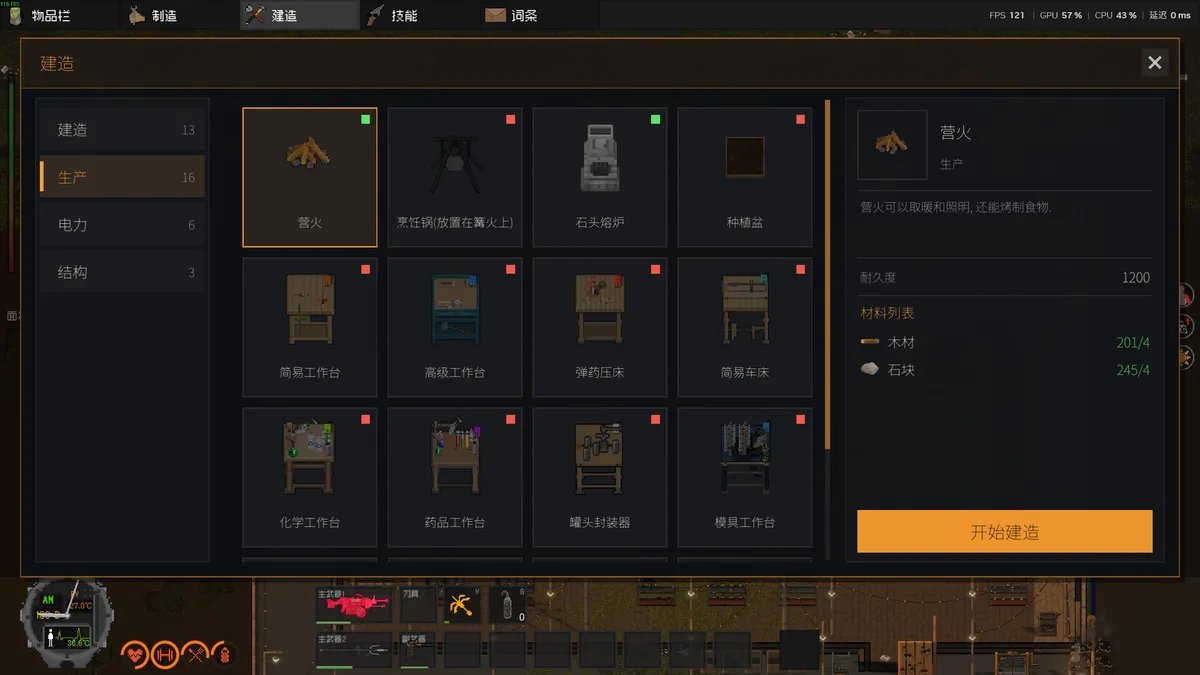
The Early Access system, as recorded during Early Access, revolved around placing pre-made structures and fixtures. It was fast and functional, and much of a starter base still comes together this way.
The headline change is voxel construction, added in the 0.9.99.9.1 beta and refined through the 1.0 hotfixes. It gives you free placement of wood, stone, metal, glass, and hay blocks as walls, floors, stairs, and roofs, supports genuine multi-story buildings, and lets furniture sit on upper floors. Version 1.0.10 added a Simple Mode on top of it, smoothing the learning curve after the launch-week patches. For the full material breakdown and load-bearing behavior, see our dedicated voxel building guide.
The practical takeaway of ZED ZONE base building: use quick placements for early shelter, then transition to voxel building for anything you expect to hold a horde.
How Should You Lay Out a Functional Base?
Good ZED ZONE base building is zoning — the quiet discipline that decides whether a night wave costs you ammo or a whole save. Divide the compound into four districts and keep the walking distances short.
Crafting district. This is the heart of the base. The workbench chain — Simple Workbench, Workbench, then Simple Lathe — plus the Chemical Bench and Medicine Bench all belong under one roof, ideally one wall away from storage. Workbenches can be picked up and moved with Q, so the layout can evolve. For recipes and bench costs, see crafting and workbenches.
Storage district. Central, roofed, and never against the outer wall. A breached perimeter should cost you defenses, not your entire stockpile of metal components and ammo. With the 1.0.11 backpack multi-select and Ctrl shortcuts, sorting a well-placed storage room is far faster than it was at launch.
Defense district. Walls, gates, firing positions, and a vehicle bay. This zone earns its own guide — plan it alongside your layout, not after it, using our base defense guide.
Farming district. Farming arrived as a headline 1.0 feature, and it belongs inside the walls but away from the crafting smoke and clutter. Keep plots near water logic and sunlight, and connect the zone to your kitchen loop for the 1.0.5 meal buffs. Full crop details live in the farming guide; specific soil and growth-time numbers are Community verification in progress.
When Should You Upgrade from a Shack to a Compound?
Treat ZED ZONE base building as a three-stage arc. Stage one is a one-room shack near wood and water — enough to sleep, stash, and craft basic tools. Stage two adds the full workbench chain, a vehicle bay, and a real wall ring. Stage three is where base building becomes base design: voxel stories, firing positions, and a farming terrace. Rushing stage three before you have the material income just paints a target on expensive walls. Let your scavenging range grow first, then let the base grow to match it.
What Are the Best Base Building Tips for Beginners?
If you are new to ZED ZONE base building, start smaller than you want: one crafting room, one storage room, one gate. New players following the beginner guide should treat the first base as disposable and the second as the real one. Keep a repair-ready loadout by the gate, mod your primary weapon early through weapon mods so night waves end quickly, and set a map waypoint on your front door the moment you claim the site. And remember the 1.0.5 quality-of-life change: Q now opens windows and vaults you through them, which turns any ground-floor window into a fast escape route when a night wave goes wrong.
In the 1.0 era, verify in-game material costs as hotfixes keep landing — eight patches shipped in the first 48 hours alone. But the loop holds: scout the site, wall the chokepoints, zone the interior, and let your base pay for itself in saved runs.
Related Articles
base
ZED ZONE Voxel Building Explained: Blocks, Stories, Simple Mode
The deepest guide to ZED ZONE voxel building: all five block materials, walls, floors, stairs, roofs, multi-story load-bearing, and the 1.0.10 Simple Mode.
guides
Zed Zone Farming Guide: Planting, Harvesting, and Meal Buffs
How farming works in Zed Zone 1.0: the new planting system, crop cycle, and the meal buffs added in hotfix 1.0.5 that make cooking a combat stat.
base
ZED ZONE Base Defense Guide: Waves, Walls, and Power
Master ZED ZONE base defense: threat model from Dormant Hordes to Horde Mode, layered fortifications, firing positions, vehicle mobility, and lighting.
Was this helpful?
Thanks for the feedback!