ZED ZONE Voxel Building Explained: Blocks, Stories, Simple Mode
The deepest guide to ZED ZONE voxel building: all five block materials, walls, floors, stairs, roofs, multi-story load-bearing, and the 1.0.10 Simple Mode.
FAQ
When was voxel building added to ZED ZONE?
Can you place furniture on upper floors in ZED ZONE?
What Is Voxel Building in ZED ZONE?
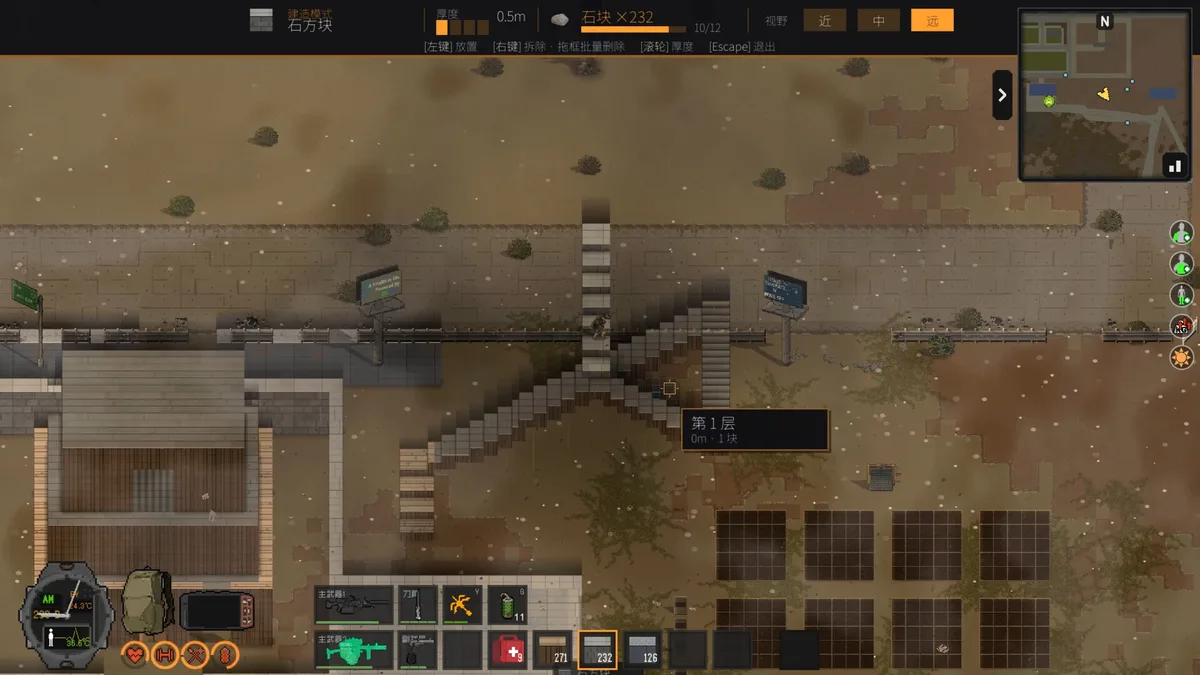
ZED ZONE voxel building is the freeform construction system added in the 0.9.99.9.1 beta on October 23, 2026 — the last major feature drop before the 1.0 launch on November 6. Where the Early Access system, as recorded during Early Access, relied on placing fixed structures, voxel building hands you raw blocks and lets you shape walls, floors, stairs, and roofs block by block, across multiple stories, with furniture placed anywhere a floor exists. It is the single biggest change to how bases look and function in the 1.0 era, and this guide covers everything currently known about it, last verified November 8, 2026, on version 1.0.11.
What Building Blocks Are Available?
ZED ZONE voxel building ships with five block materials: wood, stone, metal, glass, and hay. Each occupies the same grid logic, so mixed-material builds are normal practice rather than an exploit. Choosing between them is the first real decision every voxel building session throws at you.
| Block material | Sourced from | Best used for |
|---|---|---|
| Wood | Trees, logs | Cheap walls, early floors, scaffolding |
| Stone | Rocks | Durable ground-floor walls, chokepoints |
| Metal | Plates, scrap metal | Late-game perimeter, blast-facing walls |
| Glass | Glass items | Windows, greenhouses, firing slits |
| Hay | Plant fibre, farming byproducts | Roofing, animal-adjacent structures |
Exact HP, decay, and repair costs per block tier are Community verification in progress in the 1.0 era — the hotfixes through 1.0.11 tuned many interaction numbers, so confirm material stats in-game before committing a fortress-sized stockpile.
What Structures Can You Build?
Every ZED ZONE voxel building project is assembled from four structural elements, all confirmed in the 0.9.99.9.1 patch notes:
Walls. The vertical unit of defense and room division. Mix materials freely — a stone skirt under a wood upper wall is a standard budget pattern.
Floors. Horizontal surfaces that define each story. Floors are what separate a shed from a tower, and they are the prerequisite for every upstairs feature below.
Stairs. The connective tissue. Stair placement determines traffic flow, so plan them before the walls go up; retrofitting stairs into a finished box is the most common beginner rebuild.
Roofs. The cap that keeps the island weather off your storage. Hay roofs pair naturally with farming compounds, while metal roofs suit watchtowers.
How Does Multi-Story Load-Bearing Work?
Multi-story construction is the headline feature of ZED ZONE voxel building: the system explicitly supports multi-story buildings, which Early Access construction could only fake. The practical rules, as of the 1.0 era, verify in-game for exact limits: upper floors need supporting walls beneath them, wider spans want denser support columns, and the ground floor deserves your toughest material because it carries the whole build and takes the whole horde.
Verticality is also defense. A second story gives you firing positions that ground-level infected cannot reach, and it quarantines your loot — even if the ground floor is breached, stairs act as a second gate. For the full defensive layer around a tower build, pair this system with our base defense guide.
Can Furniture Go on Upper Floors?
Yes — furniture can be placed on upper floors, and this quietly changes base design more than any wall. In practice it means the crafting core no longer has to squat in the most vulnerable part of the compound: put the Simple Workbench and Workbench upstairs, run the Chemical Bench near a window with a firing slit, and you craft during sieges instead of hiding. Workbenches can be picked up and moved with Q, so the upstairs workshop can evolve as recipes unlock — see crafting and workbenches for the full bench chain. Storage crates, beds, and farm-adjacent shelving all belong wherever your floor plan puts them, which makes the farming-loft hybrid builds from the farming guide genuinely viable.
What Is Simple Mode?
Version 1.0.10 added a Simple Mode to ZED ZONE voxel building, one of the most-requested quality-of-life changes of the launch window. It streamlines block placement for players who found the full system fiddly, while the full mode stays available for precision builds. If the default controls fight you, switch modes before concluding the system is limited — as of version 1.0.11 both modes share the same materials and structural rules.
What Are the Limits of Voxel Building?
ZED ZONE voxel building is deep, but it is not a physics sandbox. Blocks snap to a fixed grid, so curved or diagonal architecture is approximated rather than drawn. Demolishing a misplaced block refunds materials inconsistently in the 1.0 hotfixes, so measure twice — as of version 1.0.11, undo behavior is Community verification in progress. Multi-story builds also need real material budgets: a two-story stone shell consumes several times the wood of a starter shack, and stairs eat more blocks than newcomers expect. Finally, remember that voxel building does not pause the world; raising a wall mid-wave is a last resort, not a plan. Build during daylight, scout before you stack, and treat every ambitious tower as a project, not an afternoon.
How Should You Plan Your First Voxel Build?
A proven ZED ZONE voxel building sequence — the one veteran builders run on every new save — works like this: scout the site with map waypoints, lay the ground-floor footprint in stone, raise walls one material tier above your threat level, add stairs and a second floor early, cap with a roof, and only then decorate. Start small — the base building guide zoning framework fits neatly inside a two-story voxel shell, and beginners following the beginner guide should treat their first voxel build as a practice save. With patches still landing weekly in the 1.0 hotfix wave, verify material costs as you build, and expect this system to keep growing — it is now the foundation every other base system stands on.
Related Articles
base
ZED ZONE Base Building Guide: Sites, Systems, Layouts
Learn ZED ZONE base building in 1.0: pick a site near resources and POIs, master the new voxel system, and plan crafting, storage, defense, and farm zones.
weapons
ZED ZONE Best Weapons Tier List for 1.0 (All Four Tracks)
The zed zone best weapons tier list for version 1.0: S-tier melee, bows, guns and explosives, with Early Access damage data, 1.0 changes and acquisition tips.
base
ZED ZONE Base Defense Guide: Waves, Walls, and Power
Master ZED ZONE base defense: threat model from Dormant Hordes to Horde Mode, layered fortifications, firing positions, vehicle mobility, and lighting.
Was this helpful?
Thanks for the feedback!