Zed Zone Multiplayer Guide: Co-op Modes, Room Codes, and Progress
How Zed Zone 1.0 multiplayer works: Standard, Horde, and Cataclysm co-op modes, room codes, the display bug workaround, and progress rules.
FAQ
Is Zed Zone multiplayer?
How do I join a friend in Zed Zone?
Does my progress carry over in Zed Zone co-op?
Is Zed Zone multiplayer?
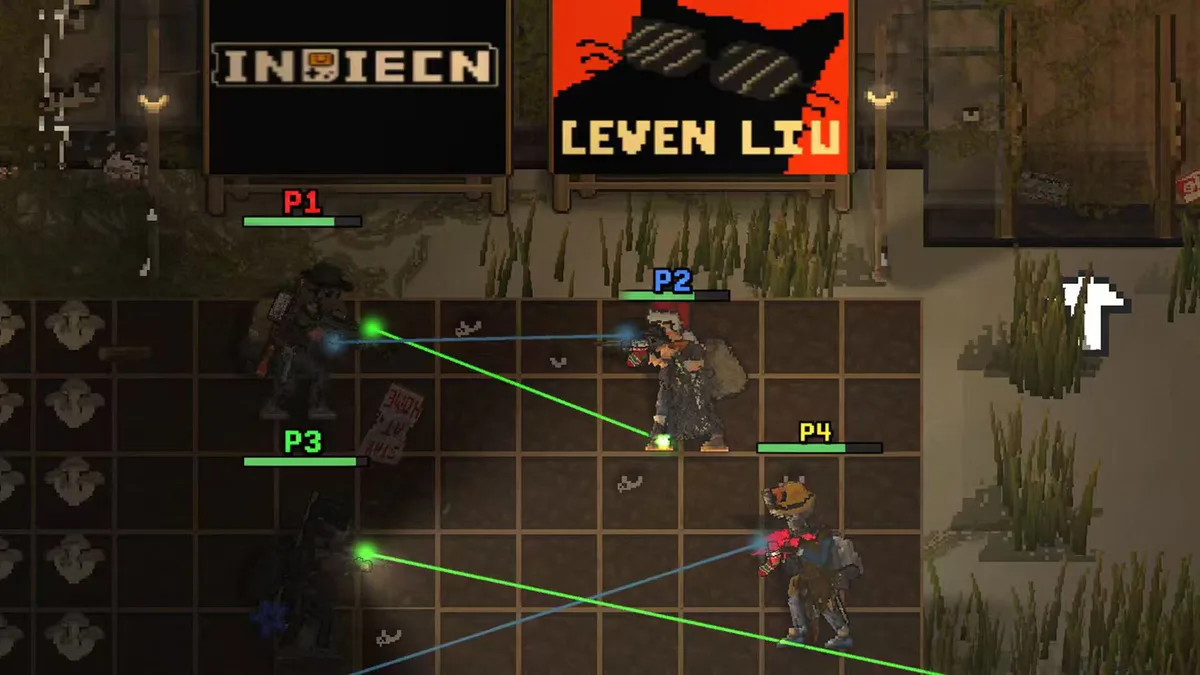
Not during Early Access — but yes now. Online co-op was the flagship feature of the 1.0 release on November 6, 2026, ending three years of single-player-only development. As of version 1.0.11, multiplayer has survived its brutal launch window with eight hotfixes in about 48 hours, and most of those patches targeted co-op specifically. If you tried multiplayer on launch day and bounced off, the experience as of November 8, 2026 is substantially more stable.
What multiplayer modes are in Zed Zone?
Version 1.0 ships with three co-op modes, selectable when creating or browsing rooms:
- Standard — the full survival campaign: crash, scavenge, craft, build, and work toward escaping the island together.
- Horde Mode — a wave-defense mode built around a mobile base vehicle, with supply airdrops after each wave. Details in the Horde mode guide.
- Cataclysm Mode — a harder variant of the survival ruleset with escalated threats and better rewards. Details in the Cataclysm mode guide.
The room list added mode filters in hotfix 1.0.4, so you can browse only the mode you want instead of scrolling every open room.
How do room codes work?
Hosts create a room and receive a six-digit room code; friends enter it to join. Rooms can be password-protected. Hotfix 1.0.11 added pinned rooms that stay at the top of the list — private rooms included — and the client now remembers your last password, which removes the launch-week friction of re-typing credentials every session.
Maximum players per room is Community verification in progress — the official announcements confirm the mode and code systems but do not state a player cap, and we do not invent numbers.
What is the room code display bug and how do I fix it?
Between hotfixes 1.0.5 and 1.0.8, a bug caused typed room code digits to not render in the input field. The workaround, confirmed by the developer during the launch window:
- Type the six-digit code normally — it is invisible, but it is being entered.
- If the room has a password, enter the password first.
- Click Join anyway.
The code resolves server-side, so Join succeeds even with a blank-looking field. This was permanently fixed in 1.0.8, so on current versions you should simply see your digits. If you are on an older build, update before troubleshooting anything else.
How do I create or join a room?
Creating a room is host-driven: pick your mode — Standard, Horde, or Cataclysm — set a password if you want a private session, and the game assigns your six-digit room code. Share the code with your group through whatever channel you already use; the code plus optional password is the whole invite system. Joining is the reverse: open the multiplayer room list, optionally filter by mode, type the code, and press Join.
Two practical habits from the launch window. First, pin your regular group’s room — hotfix 1.0.11 added pinned rooms that stay atop the list, private rooms included, and the client remembers your last password, so standing groups no longer re-enter credentials every night. Second, agree on the mode before anyone makes a character decision: Standard runs reward patient loot-and-build play, while Horde sessions are pure combat pacing, and swapping expectations mid-session wastes everyone’s evening.
What progress do I keep in co-op?
Your character’s progression persists across multiplayer sessions — the 1.0 launch notes describe guests keeping their character progress when joining hosts’ worlds, and hotfix 1.0.5 eliminated the launch-week bug where that progress rolled back. The exact granularity of what transfers (inventory, skills, world state) is Community verification in progress; the confirmed facts are that character progression is retained and the rollback bug is fixed.
Worth knowing since the final beta: character saves and world saves are now separate files, so your co-op character and your solo world do not fight each other. How the game arbitrates one character across multiple hosts’ worlds simultaneously is Community verification in progress.
Every multiplayer fix since launch
If you are returning after a frustrating launch weekend, here is what changed in co-op between 1.0.4 and 1.0.11:
| Hotfix | Co-op changes |
|---|---|
| 1.0.4 | Room list mode filters and faster loading; fixed bodies rendering with only head accessories |
| 1.0.5 | Fixed multiplayer character progress rollback |
| 1.0.8 | Fixed the room code display bug |
| 1.0.10 | Major item duplication and loss fixes: crate organizing, full crates, ground bags, equipment duplication; ground bags lock while another player views them; guests not seeing host vehicles or items fixed |
| 1.0.11 | Pinned rooms (private included, remembers last password); camp doctor heals multiplayer characters — skip sleep and pay for instant cure; Cataclysm sessions returning to the main menu no longer convert to single-player |
The 1.0.10 patch was the pivotal one: item duplication and loss were the two most reported co-op problems on launch day, and the fixes covered crates, ground bags, and equipment slots together.
Co-op survival tips
Multiplayer changes the math of survival. Split roles early — one player drives loot runs while another fortifies — and remember that noise multiplies: two survivors fighting at once draw more infected than either would alone. Special infected like Blasters and Spitters punish groups standing close together, so spread out during fights. If your group wants a structured combat session rather than open-world survival, Horde Mode was built exactly for that, and you can review what you will face first in the enemies guide.
Does multiplayer change difficulty?
Whether the game scales enemy pressure with player count is Community verification in progress — the official notes describe the co-op systems without documenting difficulty scaling rules. Plan as if it does not: bring full kits, and treat shared resources like medicine and ammunition as communal property with a designated quartermaster. The one confirmed scaling-adjacent fact is the exoskeleton carry-weight rebalance in hotfix 1.0.4 — powered exoskeleton pieces no longer count against carry weight and armor adds 25 kilograms of extra capacity — which benefits every member of a loot-heavy squad.
Can a brand-new player join a veteran’s world?
Yes, and hotfix 1.0.5 made it safe: before that patch, joining a session could roll a guest’s progress back, which made co-op a risky proposition for new characters. With the rollback fixed and character saves separated from world saves in the final beta, a beginner can squad up with veterans without endangering their own progression. The beginner guide habits still apply in someone else’s world — eat, cook, and avoid hospitals — but co-op is now the gentlest on-ramp the game has ever had.
Related Articles
guides
Zed Zone Guide: Your First 24 Hours After the Crash
Practical Zed Zone tips for your first 24 hours: scavenging, crafting priorities, starter base setup, and surviving night one in version 1.0.
guides
Zed Zone Cataclysm Mode Guide: Difficulty, Loot, and Differences
What Cataclysm Mode changes in Zed Zone 1.0 compared to Standard: how the harder mode escalates threats, what better loot means in practice, and who it is for.
guides
Zed Zone Ending Walkthrough: How to Escape the Island
How to finish Zed Zone: a spoiler-free preparation checklist first, then the escape walkthrough with the east-coast vessel and finale requirements.
Was this helpful?
Thanks for the feedback!