Zed Zone Guide: Your First 24 Hours After the Crash
Practical Zed Zone tips for your first 24 hours: scavenging, crafting priorities, starter base setup, and surviving night one in version 1.0.
FAQ
What should I do first in Zed Zone?
Is there a tutorial in Zed Zone 1.0?
How do I not die on my first day?
What should I do first after crashing on the island?
When you boot up Zed Zone for the first time, you wake up next to a burning wreck on a quarantined island. The 1.0 release completely reworked this opening: the new tutorial sequence, introduced with the final beta build 0.9.99.9.7 on November 3, 2026, walks you through movement, scavenging, crafting, and combat before it lets you loose. Follow it. Even if you normally skip tutorials, the new opening deposits you beside useful early loot and teaches the PDA, the single most important tool in the game.
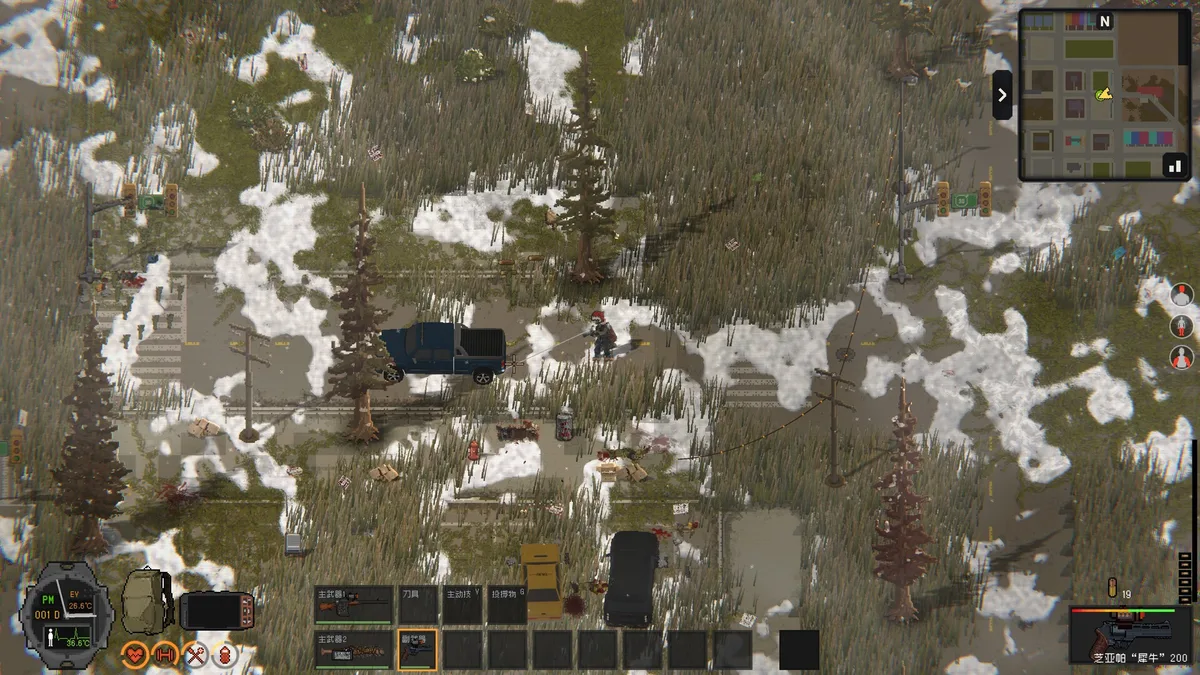
Your first thirty minutes have one goal: leave the crash site with a full backpack. Check every container, corpse, and vehicle in the immediate area. Prioritize water, non-perishable food, bandages, and any melee weapon. Infected near the starting area are sparse but real — crouch-walk around them rather than fighting. Every point of durability and health you save on day one is a point you will want on night three.
How do I survive the first day?
The day loop is simple: scavenge by day, craft and fortify by evening, sleep through the most dangerous hours. On day one, work an expanding circle around the crash site, clearing houses one at a time. Houses give cloth, canned food, wood, and scrap; garages give tools and vehicle parts; shops give food and cooking supplies.
Two threats punish new players. First, food poisoning: cooked meat is safe, but spoiled or questionable food wrecks your stats. Second, over-looting: weight slows you down, and a slow survivor is a dead one. Drop low-value bulk items — extra clothing, worn tools — and keep slots free for what matters.
Watch the light. Dusk is when you should already be indoors with a workbench running, not negotiating with a zombie in an open field.
Which tools should I craft first?
Crafting is the backbone of progression, and the chain starts at the Simple Workbench. Your first craft targets:
- Stone axe, stone hammer, stone pick — cheap, repairable, and they cover chopping, smashing, and mining
- A campfire for cooking meat and boiling water
- Bandages or cloth wraps
- Storage crates once you have a roof
The full bench chain — Simple Workbench to Workbench to Simple Lathe, plus the Chemical Bench — is covered in our crafting and workbenches guide. Do not rush it. A stone tool set and a stocked pantry beats an advanced bench with no materials to feed it.
As recorded during Early Access, stone tools deal 48 damage per swing and iron tools 72 — enough for common Infected, never worth swinging at Breakers. Repair tools at the appropriate bench before they break, and always carry a spare.
Where should I build my first base?
Location matters more than walls. Pick a spot near, but not inside, a mid-density loot area: walking distance to houses and shops, far enough from military bases and hospitals that high-tier enemies do not wander into your bedroom. The main island’s roads and buildings were completely re-planned in the final beta, so older Early Access base-location advice may be outdated — scout before you commit.
Your first-night base needs, in order: a door you can close, a bed or sleeping bag, a campfire, a Simple Workbench, and crates. Read the base building guide before placing your first wall — snap rules are much cheaper to get right the first time. Once settled, start thinking about defense, because the island’s hordes do not send warnings.
How do I fight, and when should I run?
Most enemies you meet early are common Infected — 228 HP for the weakest tier as recorded during Early Access. They die to a dozen stone-axe swings, but every swing costs stamina and every bite costs bandages. Early on, the winning move is almost always to run: Infected lose interest, and you keep your health bar intact.
Learn the special infected silhouettes early. Blasters explode into acid, Spitters shoot acid projectiles, Botanics sprout vines when wounded, and Crawlers are fast. All of them cluster near hospitals and military zones — exactly the areas a new player is drawn toward for loot. Our enemies guide lists the full roster with HP and drops. If you see something you cannot name, leave; the loot will still be there tomorrow, but your character has one life per save.
If a towering machine with lasers appears — a War Machine — do not engage at all on day one. As of the 1.0 era, verify in-game, but kiting one into a pack of zombies is an advanced trick, not a starter strategy.
What should my second day look like?
By dawn of day two you should have tools, a shelter, and a food buffer. Now push outward: find a bicycle (they spawn at houses, shops, and roadsides since the 0.9.99.9.1 update), open the PDA map page to mark points of interest, and scout a vehicle for later. Gasoline vehicles are long-term projects — they break when you hit things and need Vehicle Repair Kits — but a working car changes the map’s scale completely.
Spend attribute points as you earn them: Strength if you fight, Agility if you loot, Endurance for quality of life, Energy for longer sprinting. Mutant tissue butchered from infected feeds doses that unlock the skill tree, so butcher what you kill.
Zed Zone tips checklist
- Follow the 1.0 tutorial — it is new and genuinely useful.
- Loot water and food before weapons; hunger ends more runs than zombies do.
- Craft stone tools first and repair them before they break.
- Build near loot, away from military bases and hospitals.
- Run from fights you do not need. Save durability, bandages, and stamina.
- Cook everything. Food poisoning is the most embarrassing death on the island.
- Mark your base on the PDA map immediately — waypoints were added in the final beta.
- Check the map guide for points of interest and the ending walkthrough once you are ready to actually escape.
- If a mechanic confuses you, the console commands reference documents the in-game console for testing and recovery.
Related Articles
guides
Zed Zone Cataclysm Mode Guide: Difficulty, Loot, and Differences
What Cataclysm Mode changes in Zed Zone 1.0 compared to Standard: how the harder mode escalates threats, what better loot means in practice, and who it is for.
guides
Zed Zone Multiplayer Guide: Co-op Modes, Room Codes, and Progress
How Zed Zone 1.0 multiplayer works: Standard, Horde, and Cataclysm co-op modes, room codes, the display bug workaround, and progress rules.
guides
Zed Zone Ending Walkthrough: How to Escape the Island
How to finish Zed Zone: a spoiler-free preparation checklist first, then the escape walkthrough with the east-coast vessel and finale requirements.
Was this helpful?
Thanks for the feedback!